Sheets.
Explore the possibilities.
Build spreadsheets in your browser with formulas, formatted tables, charts, PivotTables and analysis tools.
Open Sheets ↗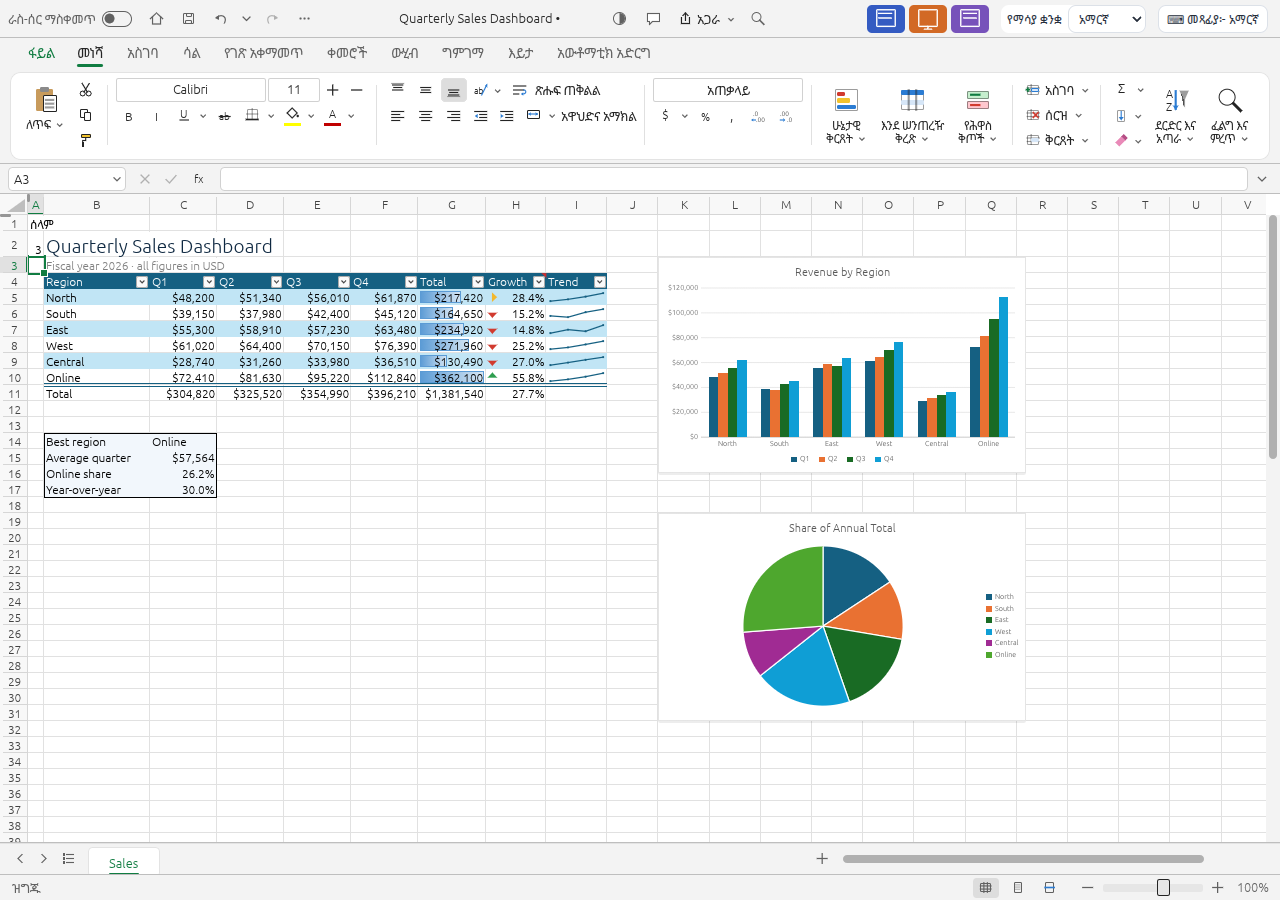
Feature guides
Open, save and organise workbooks
Start a spreadsheet and keep an editable copy of your work.
Feature guideEnter, fill and edit cells
Work efficiently with rows, columns, ranges and repeated data.
Feature guideFormat cells and highlight important values
Make spreadsheets easier to read with number formats and conditional rules.
Feature guideFormulas, functions and calculation
Calculate results and understand how cells depend on one another.
Feature guideTables, sorting and data cleanup
Turn a raw list into a structured, searchable worksheet.
Feature guideCharts, sparklines and visual objects
Explain spreadsheet values with charts and compact visual summaries.
Feature guidePivotTables and PivotCharts
Summarise a data table by categories without rewriting the source.
Feature guideWhat-if analysis, forecasting and Solver
Explore alternative inputs and build analytical worksheets.
Feature guideReview, protection, views and printing
Prepare a workbook for review and inspect its printed layout.
Detailed reference
Import ODS data and rebuild live formulas
Learn exactly what the data importer retains, why cached formula results matter, and how to save a converted workbook.
ReferenceImport XLSB data and restore number formats
Learn exactly what the data importer retains, why cached formula results matter, and how to save a converted workbook.
ReferencePictures in cells: placement, sorting and compatibility
Use in-cell images deliberately and understand their effect on formulas, spill ranges and XLSX compatibility.
ReferenceFormula syntax, names and language
Use English function names and separators in the Amharic and English browser interfaces, with practical calculation examples.
Open, save, and share
| Format | Open / import | Save / export | Notes |
|---|---|---|---|
| XLSX | Yes | Yes | Primary browser Save As format; advanced imported features may be simplified. |
| XLSM / XLTX / XLTM | Yes | No | Import supported; browser Save As uses XLSX, so do not rely on browser output to retain macros. |
| XLS / XLT | Yes | No | BIFF8 partial import; use XLSX for the edited copy. |
| XLSB / ODS | Yes | No | Primarily values and cached formula results, not full editable format preservation. |
| CSV / TSV / TXT | Yes | No | Text import; this table describes browser save UI, not headless engine export. |
| No | Yes | Export; inspect non-Latin text and page layout. |
Browser limitations
- Browser Save As writes XLSX; the engine format catalog is broader than the browser save UI.
- No real-time co-authoring, cloud storage, VBA execution or Power Query-compatible refresh.
- ODS and XLSB import mainly values and cached results; legacy XLS imports are partial.
- Advanced charts, extensions and unsupported workbook parts may be simplified or lost on save.
- Encrypted workbook opening does not provide encrypted saving.
- PDF output has non-Latin font limitations; inspect multilingual exports.
- Some spreadsheet functions remain unsupported; analysis outputs and what-if data tables may be static.
Frequently asked questions
Can I open Excel workbooks online?
Yes. Open supported XLSX workbooks and save an XLSX copy from the browser. Verify complex imported formulas and charts.
Can I use formulas and PivotTables?
Yes. Formula editing, many function families, PivotTables and PivotCharts are implemented, with compatibility limits.
Can I save a CSV from the browser?
The ordinary browser Save As flow downloads XLSX. CSV capabilities in the underlying engine do not imply a CSV option in that browser flow.
Can I run Excel macros?
No. VBA does not execute. Do not use browser XLSX output as a way to preserve a macro-enabled original.
Does a PivotTable refresh automatically after every source change?
Review the selected source and refresh the report after changing data. New rows outside the source may not be included.
Can I print a spreadsheet?
Yes. Use browser printing or PDF export and inspect the page layout. Verify non-Latin text carefully in PDF output.